
Excel MRP Template: Powerful 9-Sheet BOM & ABC Model
About this template
This Excel MRP template turns a weekly demand forecast into a complete, time-phased material plan without a single manual calculation. Enter your forecast once and the workbook explodes it down through a multi-level bill of materials, nets it against stock, and tells you exactly what to order and when.
Built for manufacturers, warehouse teams and purchasing departments who need real MRP logic but can’t justify an ERP rollout.
What’s Inside the Excel MRP Template
Nine linked sheets, 44 items and 54 BOM lines, all formula-driven:
- Cover — sheet index and colour-coding legend
- Settings — plan start date, horizon and ABC thresholds as named ranges
- Item Master — cost, lead time, on-hand, safety stock, MOQ, order multiple, supplier
- BOM — multi-level parent/component structure with scrap allowance
- Demand — your only input sheet
- MRP — the 264-row netting engine
- Shortages — automatic exception report
- ABC Classification — Pareto ranking and cycle-count policy
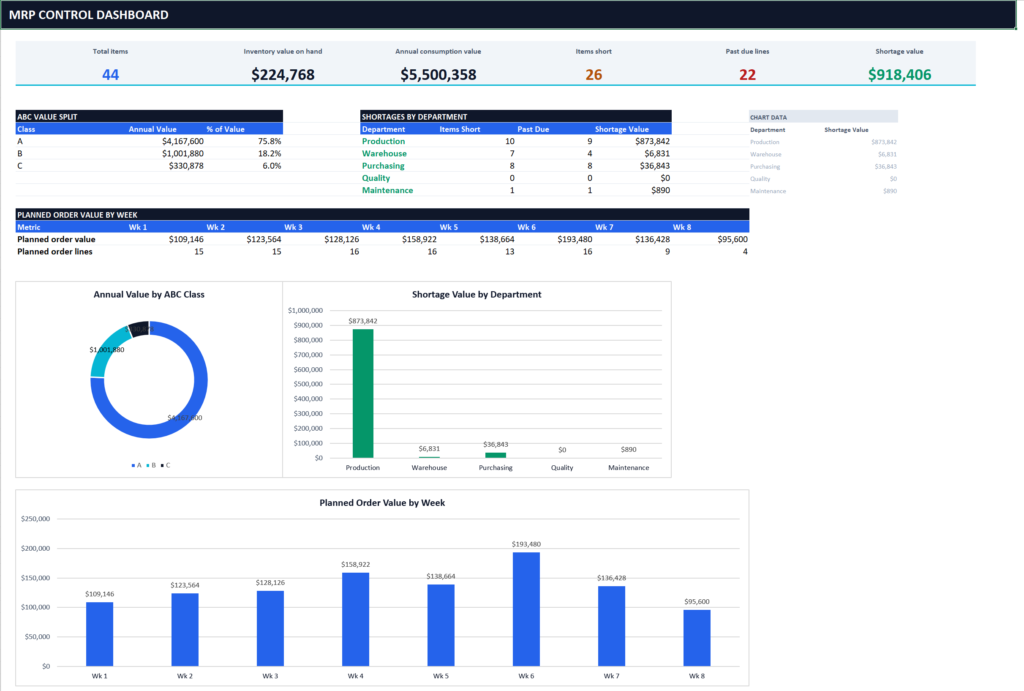
- Dashboard — six KPI cards and three charts
Everything sits in one file. No cross-workbook links to break when you rename or move it.
How the MRP Engine Works
Each item gets a six-line block: Gross Requirements, Scheduled Receipts, Projected On Hand, Net Requirement, Planned Order Receipt and Planned Order Release.
Items are planned in low-level-code order — finished goods first, then sub-assemblies, then purchased parts — so dependent demand cascades correctly down every BOM level. This is the same low-level-coding-logic used by commercial MRP systems.
Net requirement respects safety stock and prior-period stock. Planned receipts round up to MOQ and order multiple. Releases offset backwards by each item’s lead time, so you see the date you must place the order — not just the date you need the part.
Automatic Shortage Reporting
The shortage sheet is extracted straight from the MRP. Nothing is typed in.
For every item it returns total net requirement, suggested order quantity, first shortage week, required release week, value at risk and a plain-English action. Anything whose release date has already passed is flagged PAST DUE in red.
The sample data ships with 26 items short and 22 past-due lines worth $918,406 — so you can see the logic firing before you load your own numbers.
ABC Classification and Cycle Counting
The workbook ranks all 44 items by annual consumption value, builds the cumulative Pareto curve, and classifies each against thresholds you control on the Settings sheet.
In the sample data, 7 class-A items carry 75.8% of total value — a textbook 80/20 split. Each class maps to a recommended count frequency: monthly for A, quarterly for B, half-yearly for C. That aligns with standard ASCM inventory practice for cycle-count programmes.
Change a threshold and all 44 classes re-derive instantly.
Who Should Use This Excel MRP Template
- Small manufacturers running planning in spreadsheets today
- Purchasing teams needing a defensible expedite list each Monday
- Warehouse managers setting up a cycle-count programme
- Supply chain students learning MRP mechanics transparently
Requires Microsoft Excel 2016 or later. Uses standard functions only — no macros, no add-ins. See Microsoft’s SUMIFS and INDEX reference if you want to trace the formulas.
Related reading: How to calculate safety stock · BOM structuring best practice · Cycle counting guide · Inventory KPI dashboard templates
FAQ
Can I extend past 8 weeks? Yes — copy the week columns across; the lead-time offset adapts.
Does it handle multi-level BOMs? Yes, that’s the core of it. Finished good → sub-assembly → raw material, with scrap at every level.
Are macros required? No. Formulas only, so it opens safely anywhere.
How to use it
Download the file, open it in Excel or Google Sheets, and replace the sample inputs with your own data — calculated fields update automatically. Cells you should edit are highlighted; everything else is formula-driven. If anything is unclear, contact us and we’ll point you in the right direction.
Members-only template
This one requires a free account — it takes under a minute, and every template becomes a one-click download.
Create a free account