
Excel Inventory Management System
About this template
Excel Inventory Management System – Stock, Orders & Sales Dashboard Template
Run your entire small-business inventory from a single Excel workbook. This ready-to-use inventory management template combines stock tracking, purchase orders, sales orders, customer and supplier records, and a live reporting dashboard — no complicated software, subscriptions or setup required.
Everything is driven from one clean control sheet with colour-coded menu buttons, so you can switch between Customers, Suppliers, Products, Purchases, Sales Orders and the Dashboard in a single click. Add, edit, search and delete records without touching the backend — the workbook handles IDs, totals and calculations automatically.
Key features:
- Product & stock control – track purchase price, sales price, quantity in stock and value on hand
- Purchase orders – record supplier orders with auto-filled details, line items and running totals
- Sales orders & invoicing – build customer orders with automatic GST tax calculation, subtotal and total, and one-click printing that fits to one page
- Customer & supplier database – searchable contact lists with auto-generated IDs
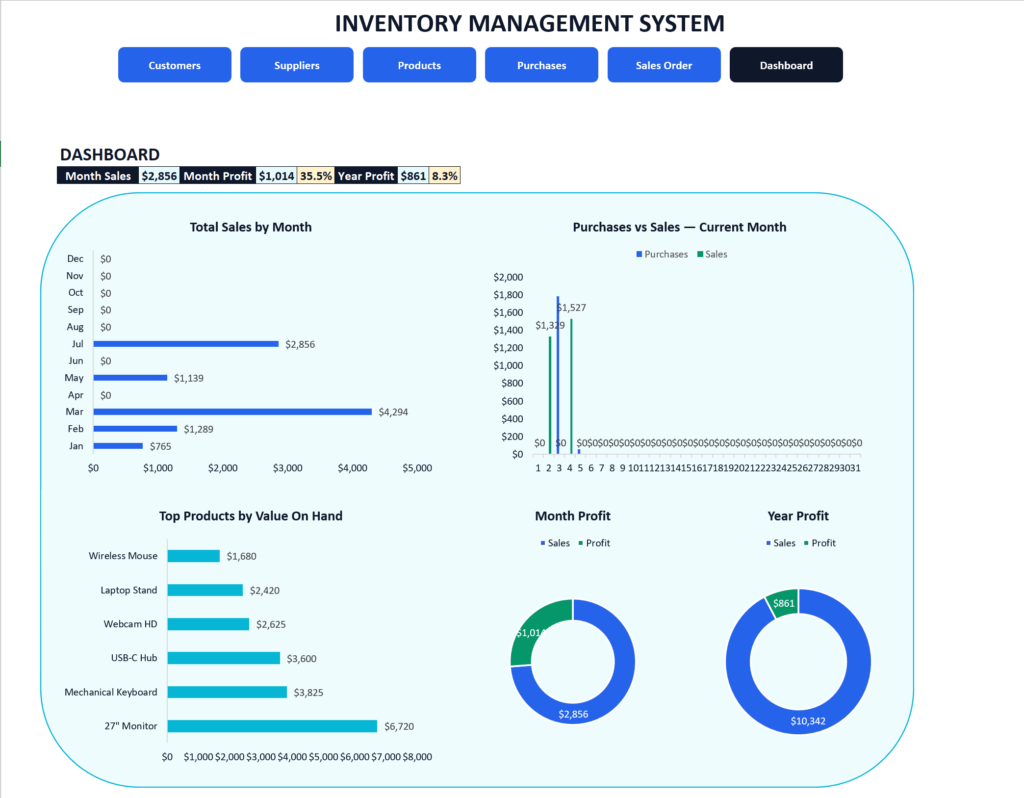
- KPI dashboard – sales, purchases and stock metrics with charts that refresh automatically for the current month and year
- Adjustable GST settings – set tax rates and toggle purchase/sales tax on or off
- Built-in “How To Use” guide – step-by-step instructions included
Ideal for small businesses, retailers, wholesalers and startups looking for a simple, affordable inventory tracker in Excel.
Download & compatibility
Built for Microsoft Excel and macro-enabled (.xlsm). Some features rely on macros and won’t work in Google Sheets, Apple Numbers, or Excel for the web.
Why it’s delivered as a .zip
Macro-enabled workbooks are routinely blocked, stripped, or altered by browsers, email filters, and corporate download gateways. Packaging the file in a .zip means it reaches you exactly as we built it — nothing removed, nothing corrupted. Simply unzip and open the .xlsm inside.
Enabling macros
Windows marks files downloaded from the internet as blocked. Right-click the .xlsm → Properties → tick Unblock → OK. Open the file and choose Enable Content when Excel prompts you.
The macros in this workbook only perform the calculations described above. They don’t connect to the internet, transmit any data, or modify files outside the workbook.
How to use it
Download the file, open it in Excel or Google Sheets, and replace the sample inputs with your own data — calculated fields update automatically. Cells you should edit are highlighted; everything else is formula-driven. If anything is unclear, contact us and we’ll point you in the right direction.
Members-only template
This one requires a free account — it takes under a minute, and every template becomes a one-click download.
Create a free account